PermitFlow · 2023–2024
Hierarchical Tag System
How I designed a hierarchical tag system with variable scopes and implied relationships to eliminate tagging errors and enable AI-powered permit research.
TL;DR
Permit requirements vary wildly, and our tagging system couldn't handle this complexity, leading to mis-tagged projects and unusable AI training data. I mapped dependencies across thousands of jurisdictions and designed a hierarchical tag system with variable scopes and implied relationships. I prototyped it in v0 instead of Figma so engineers could test actual behaviors.
The structured tag system eliminated tagging errors, achieving significant data integrity improvement. The design created AI-ready structured data that enabled automated permit research. Shipped from concept to production in 3 weeks using interactive v0 prototypes.
01 · The Problem
The Old System Couldn't Handle Permit Complexity
Permit requirements vary wildly across jurisdictions—$15K thresholds in some cities, 25% area rules in others, window counts elsewhere. Our simple tagging system couldn't handle this complexity, leading to mis-tagged projects and unusable data for AI training.
- 01Free-text tags led to inconsistent formatting (e.g., "$15k", "15000", "15,000 dollars")
- 02No structure to capture boundary conditions ("greater than", "less than", "between")
- 03Missing relationships between tags created invalid combinations (e.g., cost threshold without specifying "square footage" vs "total project cost")
- 04Ops team spent hours manually cleaning data before it could be used for AI model training
02 · The Approach
Building the Structured Tag System
I mapped dependencies across thousands of jurisdictions to understand the full range of permit requirements and their variations. This revealed patterns around boundaries (greater than, less than), values (numbers, percentages), and units (dollars, square feet, window count). I designed a three-level tag hierarchy with variable scopes that break requirements into structured components.
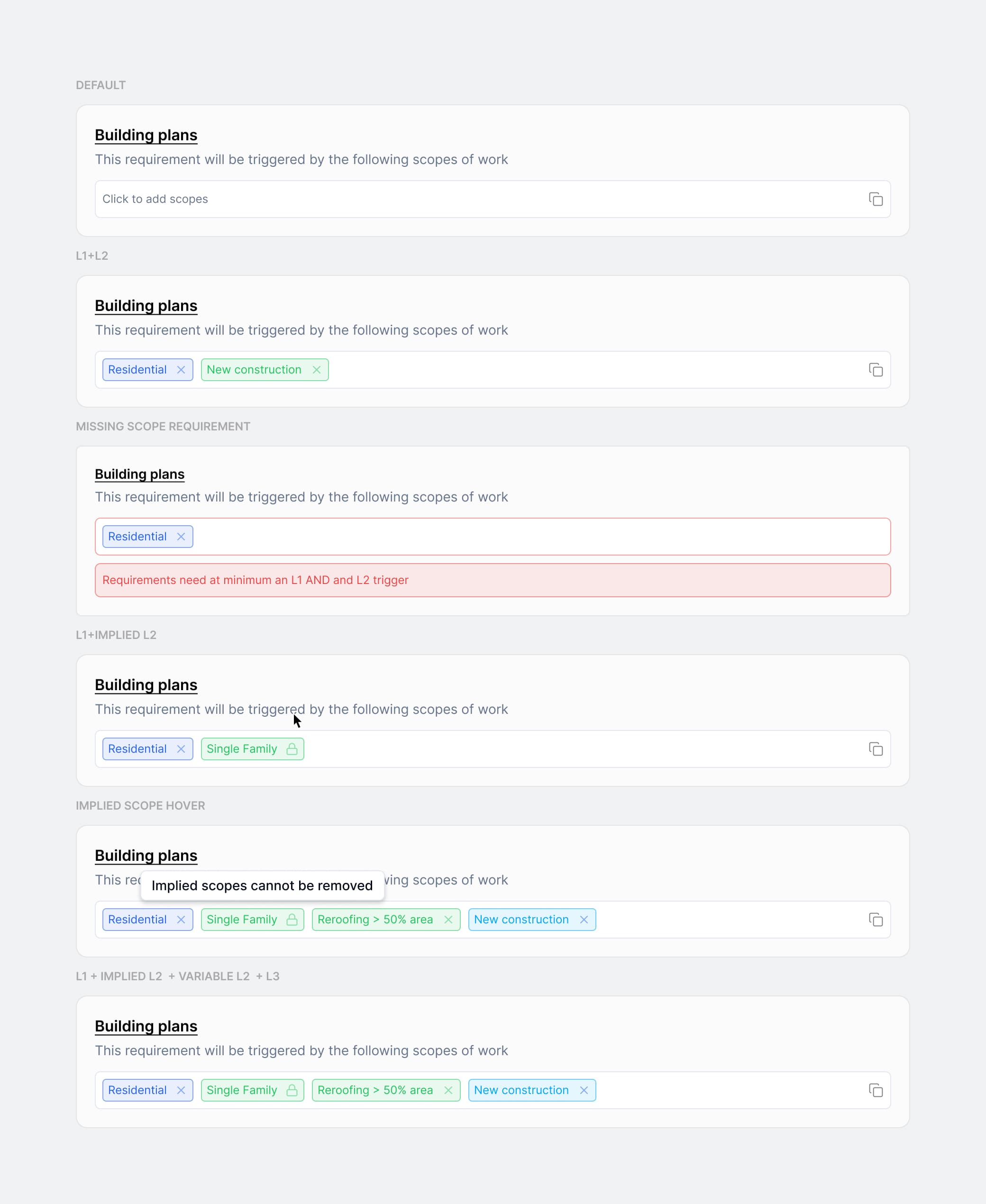
I prototyped the system in v0 instead of Figma so engineers could test actual tag behaviors and interactions. The working prototype allowed engineers to test implied relationships (selecting one tag automatically locks or suggests others) and validation rules before building the production system. The prototype was more effective than static mocks for communicating the interaction complexity.
03 · In Context
The Tag System in Context
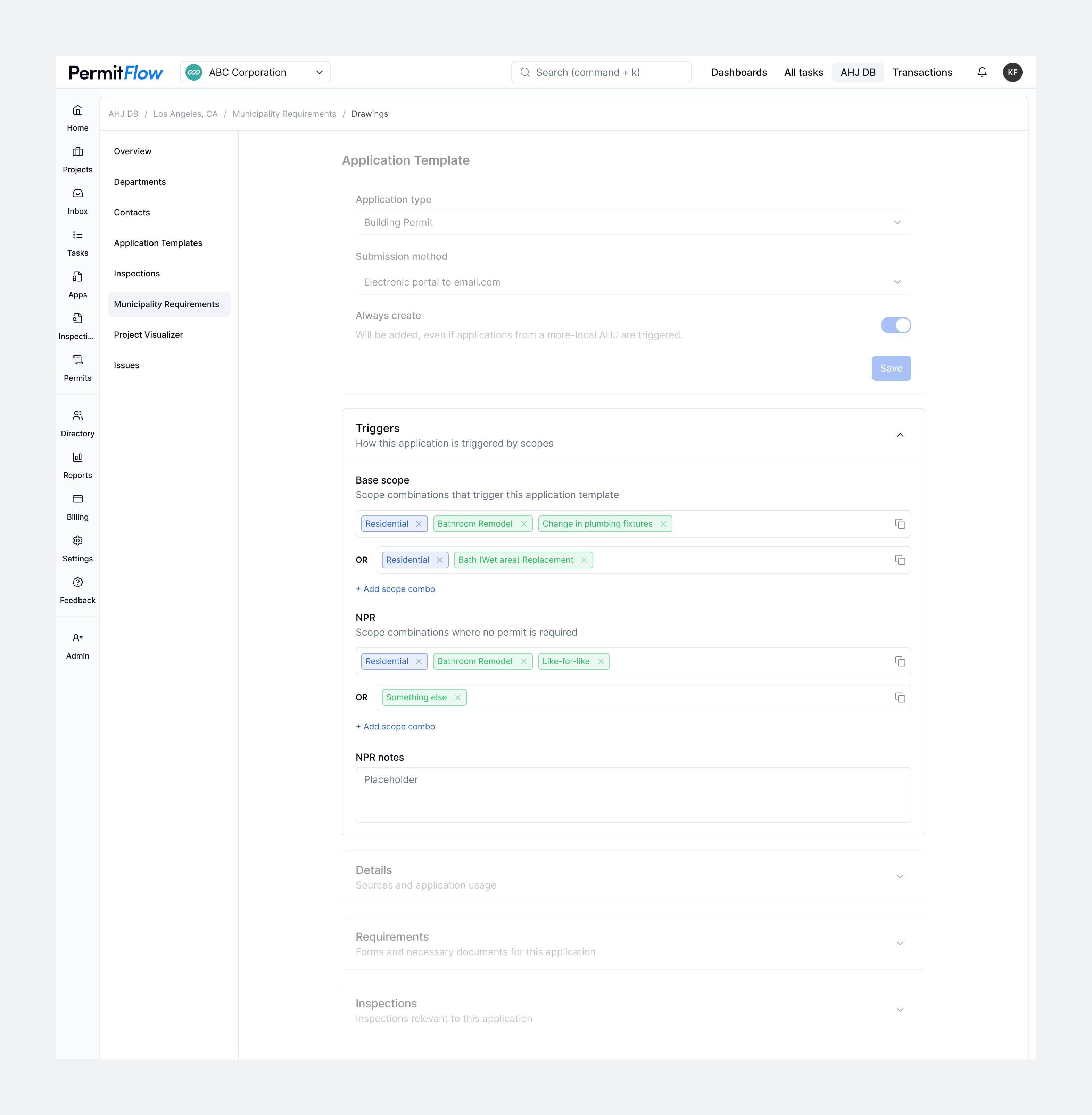
The tag system integrates into PermitFlow's application templates, allowing the ops team to configure jurisdiction-specific requirements using structured components instead of free text. Each requirement is broken down into boundary conditions, values, and units that maintain consistency and enable AI processing.
Tag Configuration Interface
The final configuration interface provides ops team members with a simple form to create and manage tags. Variable scopes (boundaries, values, units) are separated into distinct fields, ensuring data consistency while remaining easy to use for non-technical team members.
04 · Reflection
Prototyping in v0 instead of Figma was crucial—engineers could click through actual behaviors, and stakeholders could experience locked tags rather than me describing them. Static mocks would not have conveyed the interaction complexity.
Structured data beats flexibility when building for AI. Free text would have been faster to ship, but breaking scopes into components (boundary, value, unit) gave us queryable, trainable data that became the foundation for automated permit research.